Samba
Samba is a free software re-implementation of the SMB networking protocol which is used as a files and print server compatible with Windows and Unix OSs.
Deployment
The Samba server is going to be hosted in a CentOS 8 container with the corresponding mount points.
The reason why I used mount points is that limiting the shares size can’t be done using Samba.
The workaround I did was limiting the shares size with mount points and resize them from the Proxmox GUI depending on my needs. Also I can choose if they are going to be included when I do a backup of the container.
First I had to create the ZFS datasets from the host with the following commands.
mkdir /zpool/data
mkdir /zpool/data/local
mkdir /zpool/data/media
mkdir /zpool/data/cloud
zfs create /zpool/data
zfs create /zpool/data/local
zfs create /zpool/data/media
zfs create /zpool/data/cloud
For the Samba container I assigned the /zpool/data/local dataset as the mount point mp0 with an initial size of 1TB.
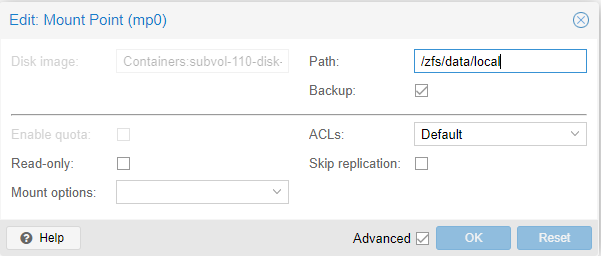
When I go into the container I could check that the directory /zfs/data is available, plus the mount point can’t even be deleted as root.
[root@Samba zfs]# rm -rf data
rm: cannot remove 'data/local': Device or resource busy
The files server is going to have a share named Efren for me and another one called General for the rest of the users connected to my home network. Other users can only access the General share while I’m able to use both.
The directory structure I created inside the local mount point through the container was done with the following commands.
mkdir /zfs/data/local/efren
mkdir /zfs/data/local/general
adduser "user"
adduser "user2"
passwd "user"
passwd "user2"
usermod -aG "group" "user"
chmod -R 0770 /zfs/data/local
chown -R root:”group” /zfs/local/general
chown -R root:”user” /zfs/local/efren
The group and owner must be set so any Samba user will be able to use the share; Samba and Unix perms are independent.
I’m not going to name the user and groups for security purposes. Installing Samba was done through the next commands.
dnf install samba samba-common
mv /etc/samba/smb.conf /etc/samba/smb.conf.bak
systemctl start smb
systemctl enable smb
systemctl start nmb
systemctl enable nmb
smbpasswd -a “user”
smbpasswd -a “user2”
Samba was installed and I set the password for both users. Then I configured it editing the /etc/samba/smb.conf file.
[global]
workgroup = WORKGROUP
server string = Samba Server %v
netbios name = Backup-Server
security = user
map to guest = never
dns proxy = no

[Efren]
path = /zfs/data/local/efren
valid users = "user"
browsable = yes
writable = yes
guest ok = no
read only = no
create mask = 1777
directory mask = 1777

[General]
path = /zfs/data/local/general
valid users = @"group"
browsable = yes
writable = yes
guest ok = no
read only = no
create mask = 1777
directory mask = 1777
I checked that the users and ACLs [1] were right with testparm and getfacl.
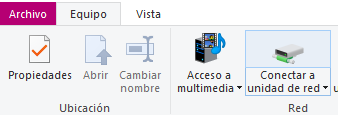
Finally I checked everything was working as expected from the MasterPC. To add the share I navigated into System using the file explorer and added a network resource clicking on the top tab.
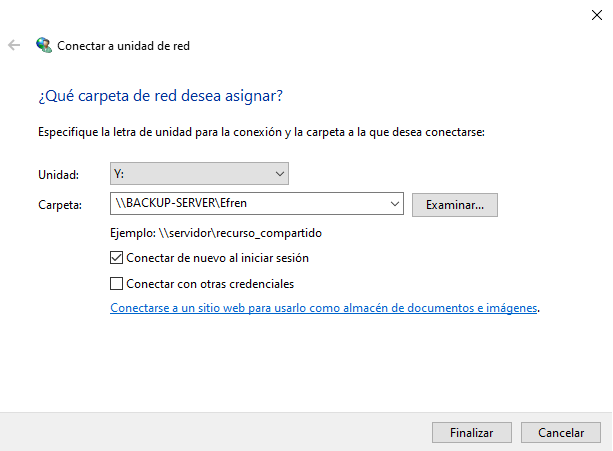
I entered the path and assigned it a drive letter.
The share was mounted so now everytime I boot my PC it will be available.
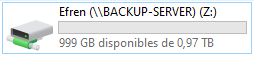
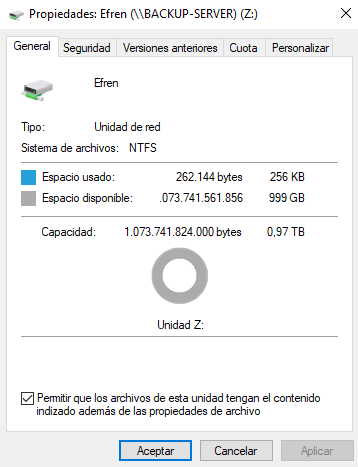
I checked that I was able to create files and folders and also that the share size could be seen right clicking on it and accessing its properties.
Footnotes
| [1] | Access Control List |